Copyright © 2026 - orienthink Team. All Rights Reserved
Information from your device can be used to personalize your ad experience.

Copyright © 2026 - orienthink Team. All Rights Reserved
Information from your device can be used to personalize your ad experience.
SEO for small business made simple: set up Google tools, find the keywords customers use, and track progress in 30 days. Start with this beginner plan.

SEO for small business usually starts the same way: you publish a website, tell a few customers, and wonder why nobody finds it. The gap is rarely a secret trick. It is usually a missing setup step, a page that doesn’t match what customers type, or advice that mixes folklore with Google’s own guidance. This guide gives you a 30-day plan built on Google’s official documentation, with a setup checklist, a worked keyword example, and clear rules for when to do it yourself and when to hire help.
These five points come straight from Google’s documentation.
SEO, short for search engine optimization, means helping search engines understand your content and helping people decide whether to visit your site, as Google’s SEO Starter Guide puts it. For SEO for small business owners, that translates into pages that are easy to find, easy to understand, and useful to the customers you want.
Search engines find pages mostly by following links, a process called crawling. They store what they find in a large database called the index. Google says no secret automatically ranks a site first. Following best practices simply makes it easier for its systems to crawl, index, and understand your content.
Organic results are the unpaid listings. According to Google’s “Do you need an SEO?” page, Google never accepts money to include or rank sites in them, and advertising has no effect on organic presence. As a result, SEO for small businesses mainly costs your time.
Here is a decision rule. SEO for small businesses is worth starting if customers already search for what you sell. If you are unsure, validate demand before you invest in new pages or products.
The table below checks six popular claims against Google’s documentation.
Popular SEO claims Vs what Google’s documentation says
| Claim | What Google’s documentation says | Source |
| The meta keywords tag helps rankings | Google doesn’t use the meta keywords tag, and keyword stuffing is against its spam policies. | SEO Starter Guide |
| Pages need an ideal word count | There is no magical word count, minimum or maximum, for ranking. | SEO Starter Guide |
| Duplicate content brings a penalty | Duplicate content under multiple URLs is not a violation or a manual action. Copying others’ content is different. | SEO Starter Guide |
| Someone can guarantee a #1 ranking | No one can guarantee a number-one ranking. | Do you need an SEO? |
| E-E-A-T (experience, expertise, authoritativeness, trust) is a ranking factor | E-E-A-T is not itself a ranking factor, and of its parts, trust is the most important. | Helpful content guidance |
| You can pay Google for organic placement | Google never accepts money to include or rank sites in organic results. | Do you need an SEO? |
Each row swaps a shortcut for a plain principle: Google asks for useful pages, not tricks. Beginners most often expect results in days, repeat keywords until the text reads badly, or trust someone who promises a ranking.
Setup comes first because a page can only attract visitors if Google can find it. A page is indexed when Google has crawled it and stored it in its index. Week one of any SEO for a small business plan has two jobs: confirm Google can see your site, and claim your local listing. The table below lists the five tasks.
Week-one setup tasks
| Task | What it does | How to confirm it worked | Effort |
| Check indexing with the site: search | Shows whether Google already lists your site | Results appear for site:yourdomain | Low |
| Set up Search Console | Shows how your site performs on Google Search | Your site appears in your account | Low |
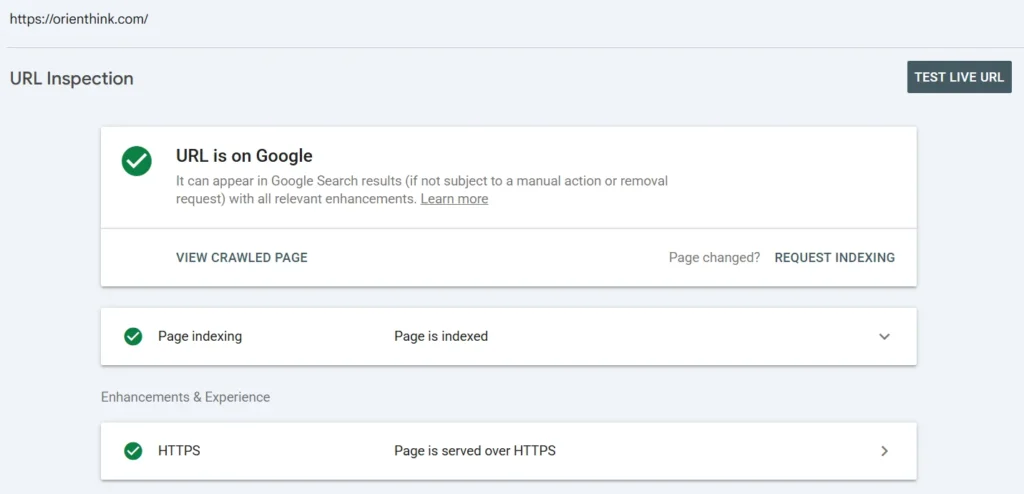
| Inspect a key page with the URL Inspection Tool | Shows how Google sees that page | The tool returns a result for the page | Low |
| Claim and verify a Business Profile | Tells Google you’re authorized to represent the business | The profile shows as verified | Medium |
| Complete the Business Profile and keep it current | Gives Google accurate business details | Every detail matches your website | Medium |
Do the three low-effort tasks first, because they reveal whether a technical problem exists. Business Profile access and features vary by country, so check Google’s help for your region.
Type site: followed by your domain, such as site:example.com, into Google. If results appear, Google already lists your site. If nothing appears, check Google’s technical requirements and make sure other pages link to yours, because Google mainly finds pages through links. A sitemap, which is a file listing your pages, helps but is not required.
Next, set up Google Search Console, which helps site owners understand how their site performs on Google Search. Its URL Inspection Tool shows a page the way Google sees it. Do not panic if a new page is missing; Google needs time to find it. If your pages differ by visitor location, remember that Google’s crawler, the software that visits pages, is generally based in the US.
Your Google Business Profile is the listing you manage for your business in Google’s local results. Verifying it tells Google you’re authorized to represent the business, which makes it more likely to show in results, according to Google’s help page. Complete, accurate details also help Google understand your business; confirm specifics on that help page.
Local SEO for small businesses rests on three factors. Google says local results are based primarily on relevance, distance, and prominence. Relevance is how well a listing matches the search. Distance is how far the business is from the searcher or the location in the search.
Prominence is how well known the business is, drawn from across the web, including links, articles, and directories. Review count and score also factor in.
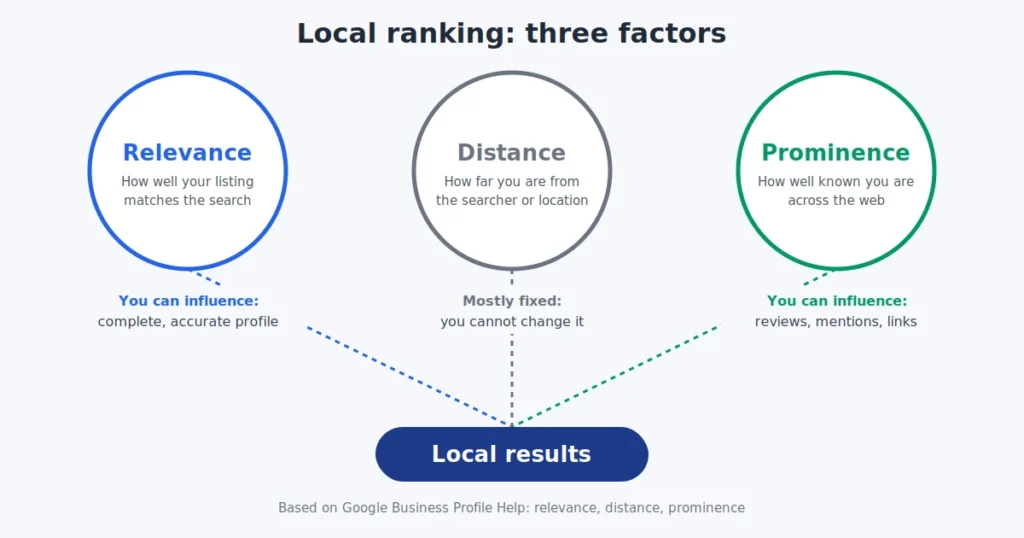
Illustrative example (fictional): Harbor Lane Bike Repair is two streets from a searcher, but its profile is half empty and few sites mention it. A rival farther away has a complete profile, steady reviews, and local press mentions. Because distance is only one factor, the rival can still appear first.
The decision rule is simple. You cannot change distance, so spend your effort on completeness and prominence. Never pay for or incentivize reviews, and check Google’s current review policy.
Good keyword research starts with the exact words your customers use, not the biggest search numbers. A keyword is any word or phrase a person types into a search engine. Beginners and experts often describe the same problem differently, and Google says its systems can match pages to many queries even without exact terms. So write naturally.
Small business SEO works best when you follow four steps. You need no paid tools to begin.
The table below is an illustrative example for the fictional Harbor Lane Bike Repair. Replace each row with your own customers’ phrases.
From customer phrase to page (illustrative)
| Customer phrase | What they want | Page that should answer it | Primary phrase |
| “my bike chain keeps slipping” | Diagnose a problem and find a fix | Chain and gear repair page | bike chain repair |
| “how to fix a flat tire” | Decide whether to repair it themselves or book | Flat tire repair page | flat tire repair |
| “bike shop open Saturday” | Find hours and location | Contact and hours page | bike repair shop open Saturday |
| “electric bike battery not charging” | Troubleshoot or find a repairer | Electric bike repair page | electric bike repair |
Pick a phrase only when you can build the most genuinely helpful page for that intent, and skip the rest. Offer original information rather than a rewrite of a competitor’s page.
Google says compelling, useful content will likely influence your presence in search more than any other suggestion in its SEO Starter Guide. Useful means well organized, unique, up to date, and written for people first. Two things shape what people see in results: the title link, which is the clickable headline, and the snippet, which is the preview text beneath it. SEO for small business pages starts with getting both right.
Google says good titles are unique, clear, concise, and accurate, and they may include your business name or location. Snippets mostly come from page content, though sometimes from the meta description, a short summary in the page’s code. The table shows illustrative before-and-after versions for a fictional shop.
| Element | Weak version | Stronger version | Why |
| Title | Home | Harbor Lane Bike Repair: Flat Tire and Brake Service | Unique, clear, and includes the business name |
| Description | Welcome to our site. We do bikes and more. | Flat tire, brake and gear repairs for everyday bikes. See how to book. | A short, unique, relevant summary |
| URL | /page?id=4821 | /flat-tire-repair | Descriptive words help users understand a result |
| Image alt text | IMG_2041 | Mechanic adjusting a rear brake on a commuter bike | Briefly describes how the image relates to the page |
The common mistake is one generic title on every page, so give each page its own. Google doesn’t use the meta keywords tag, so skip it. Place quality images near the text they relate to.
Strong SEO for small business pages shows real knowledge of the work. Use this checklist on each service page.
E-E-A-T is not itself a ranking factor, but Google says trust is its most important part.
Measure small business SEO by watching a few simple numbers and comparing them with a baseline you record first. A sensible order is impressions (how often your pages appeared), queries (the searches that showed them), position, clicks, and finally calls and enquiries. That order is an editorial suggestion, not an official Google sequence.
Search Console helps you understand how your site performs on Google Search, so open your own Performance report and see which of these figures it shows. Google says changes can take effect in a few hours or several months, so wait a few weeks before judging, because not every change causes a noticeable impact. For help comparing numbers, see basic data analysis techniques for business decisions.
Next, decide whether to hire. Google says a small local business can probably do much of the work itself, and the table gives rules of thumb for judging your own case.
| Situation | Lean DIY if… | Lean hire if… |
| Small local site | You can edit your pages and are willing to learn | You lack the time and can define a written scope |
| Redesign or migration | You are only editing text on existing pages | You are changing the platform, structure, or page addresses |
| Competitive or technical problems | Your pages are indexed and you are early in publishing | Pages stay missing after weeks of checks, or you cannot diagnose the issue |
Prices vary widely, so ask for a written scope and compare quotes. Watch for these red flags:
These five steps turn everything above into a month of manageable work, and you should expect gradual change rather than quick jumps. This small business SEO plan fits around a normal workload.
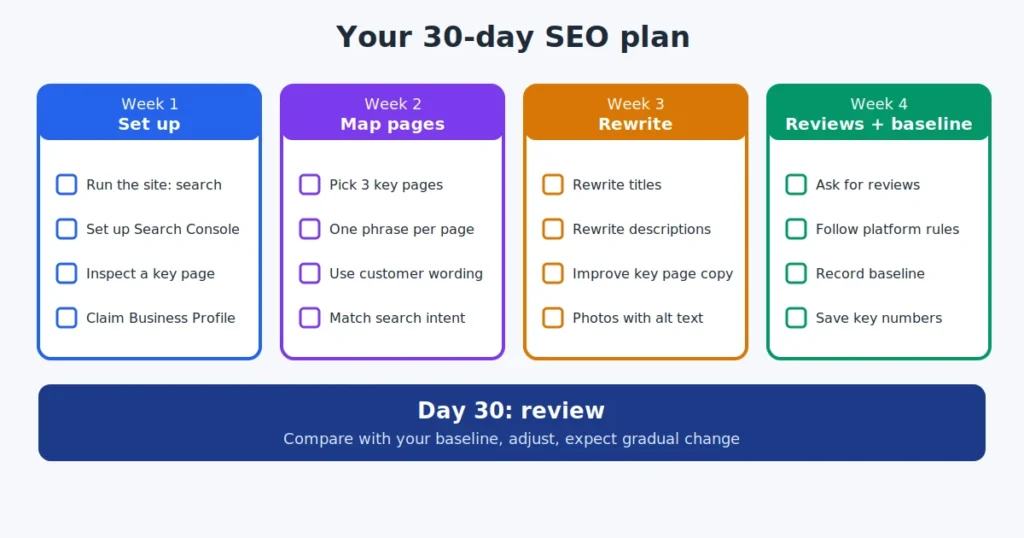
Google says word of mouth and offline promotion are effective, so put your web address on business cards and consider a permission-based newsletter. Over-promotion can backfire. SEO for small business rewards steady, honest work, and one focused month gives you a real foundation to build on.
Last updated: November 1, 2026